The phrase "MCP server" keeps showing up in AI conversations, and it sounds like more alphabet soup. It is not. It is one of the more useful ideas to come out of the AI world in the last couple of years, and once you see what it does, you will start noticing it everywhere.
If you have used Claude Code, Cursor, or any coding assistant that can poke around your database as well as your code, you have basically already touched the Model Context Protocol. This guide explains what an MCP server is, what problem it solves, where it shows up in the wild, and the honest disadvantages people rarely mention.
The Problem MCP Actually Solves
Before the Model Context Protocol existed, connecting an AI assistant to a real service meant writing a custom integration for that specific pair. Want Claude to read from a GitHub repository? Build a connector. Want it to search Slack history? Build another one. Every combination of assistant and tool needed its own bespoke wiring.
That approach works in small doses but falls apart at scale. Each integration has its own authentication, message format, and error handling. When a new AI assistant launches, every tool company must decide whether to invest in supporting it — and most decide not to.
So AI systems ended up isolated. A model can be brilliant at reasoning, but if it cannot reach your files, your database, or your calendar, its usefulness stops at the chat window.
MCP attacks this by giving compatible AI clients and servers a single way to talk. A developer builds one integration against the protocol, and any AI application that understands the protocol can use it. It is not magic, and it does not eliminate every integration headache. But it replaces dozens of one-off connectors with one standardized connection.
What MCP Actually Is
Model Context Protocol — MCP for short — is an open protocol that standardizes how AI applications connect to external tools, data sources, and workflows. Anthropic created it, open-sourced it in November 2024, and it now runs as an open project with contributions from a wide community.
The architecture splits into two simple roles:
- An MCP client is the AI application — Claude, ChatGPT, a coding tool, anything that talks to a model.
- An MCP server is the software that sits in front of a service and exposes its capabilities through the protocol.
Imagine an AI assistant wanting to look something up in your files. It sends a message to the MCP server. The server responds with what it can do, the assistant picks a capability and calls it, and the server returns the result. All of that rides on a standard protocol instead of a custom API wrapper.
Where the server supports it, it can expose three kinds of things — tools (actions it can run), resources (readable data like files or records), and prompts (reusable instructions tailored to a task). Exactly which of these a server provides is up to whichever team built it.
A useful way to picture it: think of an MCP server as acting like a menu of tools an AI can browse and use. The AI client is the customer at the counter. The server is the menu and the kitchen combined — it lists what is available, and the customer picks what they want. The menu items are the actual tools and data behind the service. You do not need to know how the kitchen works. You just order off the menu, and the kitchen handles the rest.
The official docs describe the same setup in slightly more formal terms: a host (the application you are actually using), a client (the in-app piece that maintains the connection), and the MCP server itself. Anthropic has described the whole design as MCP being like the USB-C of AI integrations. Before USB-C, each device needed its own cable and port; one standard connector made everything plug in anywhere. In the same way, one server plugs into any compatible client instead of a bespoke bridge for each pairing. The protocol has also kept evolving to make that easier at scale — in July 2026 the spec moved to a stateless, request/response core, announced on the MCP blog, so servers can now run on ordinary web infrastructure without keeping long-lived connections open.
Where You've Probably Already Seen It
MCP moved from an interesting idea to something you encounter in daily work remarkably fast. Company by company, the pattern is the same: an AI tool offers to connect to your data sources, and behind that button is an MCP server.
Coding assistants were the earliest and biggest adopters. Claude Code supports MCP natively, which is how it can query a database, read your project docs, or drive a browser tool from the same conversation window. Cursor and Codeium integrate MCP too, and Replit connects its agent to outside services — their AI can reach beyond the editor into the tools around it. Even ChatGPT and GitHub Copilot now speak the protocol.
It is not just developer tools. Anthropic originally shipped reference servers for Google Drive, Slack, GitHub, Git, PostgreSQL, and Puppeteer, and companies like Block and Apollo adopted MCP early for their own systems. Since then a whole ecosystem of servers has appeared — anything from project-management apps to music generators to marketing platforms now publish one.
The part that matters for you: an MCP server built for one client generally works with any other compatible client. Companies publish a single server, and it plugs into Claude, Cursor, and the rest. That reuse is the entire point.
The scale moved fast too. Anthropic reports that Claude's connectors directory now lists over 950 MCP servers, and protocol SDK downloads have passed 400 million a month. The official MCP Registry — the catalog where server publishers share their work — passed 10,000 public MCP servers during 2025. MCP also gained institutional backing in December 2025, when Anthropic donated the protocol to the Linux Foundation's new Agentic AI Foundation, giving an AI-critical open standard a neutral home.
Why This Actually Matters
MCP's value shows up in a few concrete places.
AI plays better with your actual data. A model that can reach your database, file store, or calendar is useful in ways a chat-only model simply is not. It can pull your real numbers, act on your real documents, and work inside the systems your team already uses.
Fewer bespoke integrations. Instead of writing a new connector for every AI assistant that appears, a team builds against the protocol once, and every compatible client can use it. That cuts real development time for tool makers.
Tools become more discoverable. Because an MCP server advertises what it can do — the menu again — AI clients can browse available capabilities rather than being hard-coded to a single action. An assistant that knows what a service offers can use it appropriately, and new capabilities show up as soon as the server exposes them.
Richer agent workflows. For anyone building AI agents, the protocol is a practical way to give an agent hands: check an inbox, update a ticket, post a draft, pull a report. The agent sequence depends on the human design, not on MCP's existence.
Do not overstate it, though. MCP enables connections; it does not guarantee that a model will use them well or that the results will be accurate. It is plumbing, not a performance booster.
Honest Limitations and Security Considerations
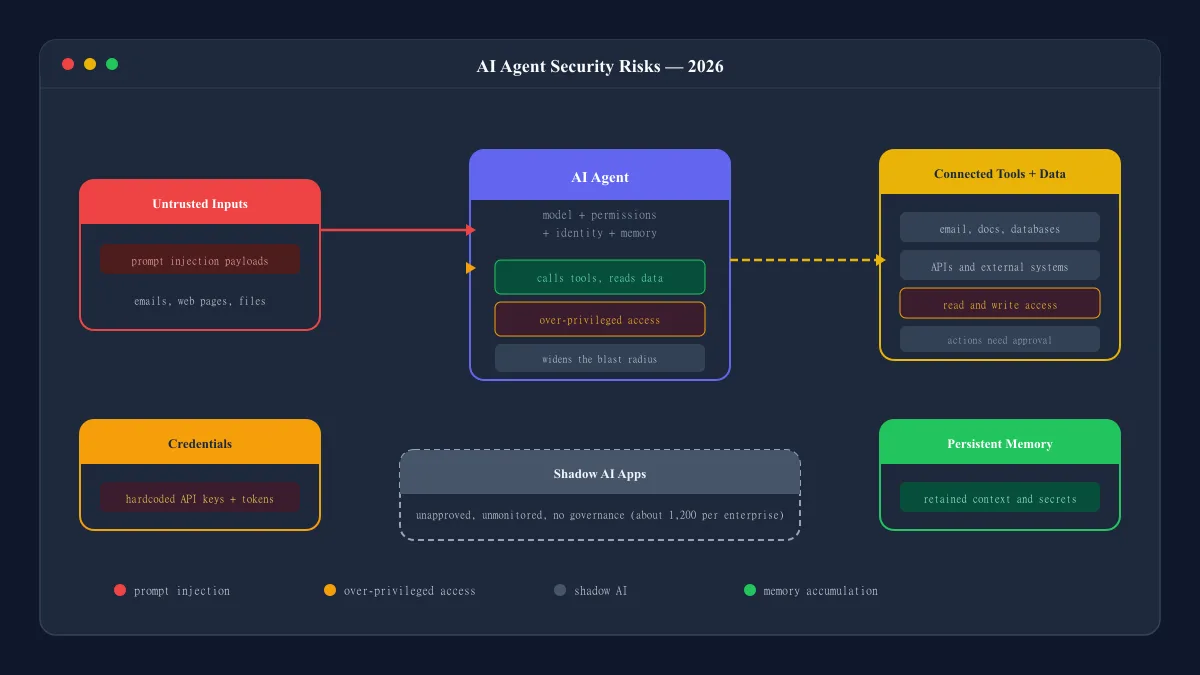
MCP makes integrations easier to build, but it does not make them safe by default. Security is up to the people who write and deploy each server.
Start with this: an MCP server is only as good as the way it describes itself. The tool descriptions and examples it exposes heavily influence whether an AI picks the right tool and uses it correctly. Poor instructions lead to poor tool selection, sloppy outputs, or the wrong action firing. This is not a flaw anyone patches away; it is inherent to how the protocol exposes capabilities to a model.
Permissions deserve real scrutiny. Some servers are read-only: they fetch data and return it. Others execute actions — sending messages, editing files, moving money in theory. The second kind is categorically higher risk. Before wiring an MCP server into anything important, review exactly what tools it exposes and who is allowed to reach them.
Credentials and sensitive data also need careful handling. A server that holds a token to your production database is a bigger target than one that reads public docs. Decide what data is genuinely necessary, keep secrets out of logs, and restrict access to the smallest set of users that need it.
And the trust chain matters. When you connect an AI client to an MCP server from an unknown publisher, you are effectively granting that server — and whatever model is driving it — access to your connected systems. Vet servers like you would vet any plugin you install. The protocol connects; it does not protect. That part is always on you.
Even the US National Security Agency has issued guidance on MCP deployments. In May 2026 its Artificial Intelligence Security Center flagged risks such as dynamic tool invocation, implicit trust between agents and servers, and prompt injection arriving through external data. The agency's recommendations echo what security reviewers have been saying: verify a server's identity, grant least-privilege access, require human confirmation for consequential actions, and log every tool call.
The Simple Version
MCP is a standard way for compatible AI applications to discover and interact with external tools and data. An MCP server wraps a service behind the protocol, listing what it can do and letting any compatible AI client call those capabilities. Anthropic created it in 2024, opened the project, and the ecosystem grew quickly — from coding assistants to calendars to content platforms.
You are almost certainly already using it without knowing the name. Companies build a server once, and every MCP-aware assistant can use it. When someone says a tool "speaks MCP," this is what they mean: plug in the server, and the AI can reach your data. Just remember the menu has a kitchen behind it — permissions, descriptions, and credentials still decide whether things go well.
Frequently Asked Questions
What is an MCP server?
An MCP server is a piece of software that exposes an application's tools, data, or resources through the Model Context Protocol. Compatible AI clients like Claude or ChatGPT can connect to it, see what it offers, and call those tools to do real work.
What does MCP stand for?
MCP stands for Model Context Protocol. It is an open protocol that standardizes how AI applications connect to external tools and data sources.
Who created the Model Context Protocol?
MCP was created by Anthropic and open-sourced in November 2024. The project is run as an open, collaborative effort with an active community of contributors.
When was MCP introduced?
Anthropic introduced the Model Context Protocol in November 2024. It launched together with the MCP specification, developer SDKs, and a set of reference servers for services like Google Drive, Slack, and GitHub.
How does an MCP server connect to AI tools?
An AI application acts as an MCP client and connects to a server over a standard transport. The client asks the server what tools it exposes, the server responds, and the client can then send tool calls and receive results. One server can work with any compatible client.
Is MCP the same as an API?
No, but the two work together. An API defines how software talks to a specific service. MCP is a common protocol that standardizes how AI clients discover and invoke tools — so a developer can build one server and have it work across many compatible AI applications instead of building custom integrations for each one.
Are MCP servers safe?
It depends on each server's implementation and permissions, not on MCP itself. Read-only servers that expose data are lower risk than servers that execute actions. Anyone deploying an MCP server should review what tools it exposes, what credentials it uses, and which users can reach it.
What can an MCP server connect to?
Almost anything with an interface worth exposing. Common examples include file systems, databases like PostgreSQL, GitHub repositories, Slack workspaces, Google Drive, calendars, and browser automation like Puppeteer. The MCP docs list file-system servers, database servers, GitHub servers, Slack servers, and calendar servers among the most common kinds.